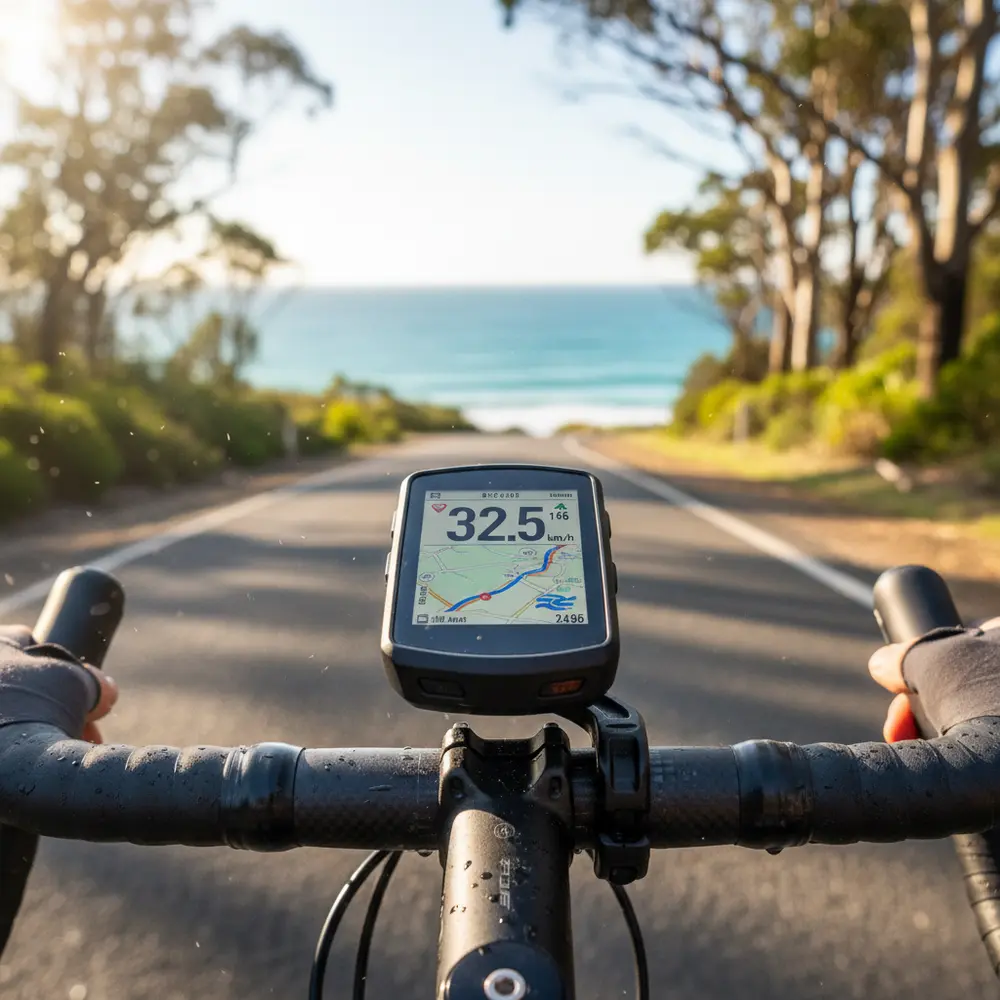
If you are still riding with your phone zip-tied to your stem, you already know the drill: glare, dead battery by kilometre 60, and a mounting bracket that gives you more wobble than confidence. A dedicated GPS bike computer changes all of that, and at the intermediate stage of your riding, the data it gives you will actually start to matter.
By the end of this guide you will know exactly which models suit intermediate Aussie riders, what features are worth paying for, what is just noise, and where to buy locally. You will also find a simple decision guide to cut through the options fast.
Note for Australia:
- All prices in this article are approximate AUD. Exchange rates shift, so always check current pricing at local retailers before buying.
- Both Garmin and Wahoo are stocked by major Australian retailers including Pushys Australia and 99 Bikes, with in-store support available at 99 Bikes locations around the country.
- Australian summer conditions, think 35-plus degree days and harsh UV glare, make screen readability and battery stability important buying factors that do not always get covered in overseas reviews.
At a glance:
- Best overall for intermediate riders: Garmin Edge 540
- Best value pick: Wahoo ELEMNT BOLT V2
- Best budget option: Garmin Edge 130 Plus
- Best for navigation and touchscreen: Garmin Edge 840 or Wahoo ELEMNT ROAM V2
- Strava Live Segments work on all shortlisted models but require an active Strava subscription
Key takeaways:
- A good bike computer is a long-term investment. Most riders grow into the features over 12 to 24 months of regular use.
- Wahoo is simpler to set up. Garmin gives you more data and mapping depth. Neither is wrong.
- ANT+ and Bluetooth dual support is now standard across mid-range computers, so sensor compatibility is rarely a limiting factor.
Why an Intermediate Rider Actually Needs a Bike Computer
Moving Past the Phone Mount - What You Gain
A dedicated GPS computer is built for the job. It handles heat, vibration, rain and direct sun without the screen washing out or the battery giving up mid-ride. The mount is solid, the interface is designed to be read at a glance, and the GPS chip is purpose-built for accurate speed and position tracking on the move.
Your phone does a passable job for casual rides. Once you are doing longer efforts, chasing Strava segments, or navigating unfamiliar routes on the Great Ocean Road or a gravel loop in the Dandenongs, the limitations become obvious fast.
The Metrics That Start to Matter at This Stage
At the intermediate level, you are no longer just tracking speed and distance. You are starting to pay attention to cadence (how fast your legs are turning), heart rate zones, elevation gain, and if you have a power meter fitted, your power output in watts. These numbers help you train smarter, pace rides better, and recover properly.
- Speed and distance - the basics, covered by every computer
- Heart rate - useful for zone-based training once paired with a chest strap or arm sensor
- Cadence - helps you develop a more efficient pedalling style
- Power - the gold standard for training load, requires a separate power meter
- Navigation and mapping - essential for multi-hour rides or new routes
- Strava Live Segments - real-time feedback on your personal records
What to Look For in a Bike Computer
GPS Accuracy and Route Navigation
Mid-range computers now use multi-band GPS chipsets, which means better accuracy in areas with tall buildings, heavy tree cover, or coastal cliffs, common in Australian riding terrain. Look for a unit that supports turn-by-turn navigation and can load a GPX route file. This matters when you are riding a new road or following an event course like one of the Bicycle Network Australia events such as Around the Bay.
Sensor Compatibility - ANT+ and Bluetooth
Most cycling sensors, heart rate monitors, cadence sensors, speed sensors and power meters, broadcast over ANT+ or Bluetooth. ANT+ is a wireless protocol designed specifically for sports sensors. It has been the standard for years, and most quality sensors still use it. Bluetooth is now equally common and is used by newer sensors and smartphones.
The good news: every computer on this list supports both protocols simultaneously. That means you can pair your old ANT+ heart rate strap and a new Bluetooth cadence sensor at the same time without any workarounds.
Battery Life and Screen Readability in Australian Conditions
Longer rides in the Australian heat can drain a battery faster than advertised specs suggest, particularly if the screen brightness is cranked up. For rides over four hours, look for a unit with at least 15 hours of GPS battery life. Screen readability matters too. In full summer sun at midday, a low-contrast display becomes unreadable. Transflective and high-contrast displays perform significantly better in bright conditions.
Best Bike Computers for Intermediate Aussie Riders
The following models cover the range that makes sense for intermediate riders. There is no point listing every computer on the market. These five are the ones worth your attention, based on hands-on reviews from Bicycling Magazine and in-depth testing by DC Rainmaker.
| Model | Approx. AUD Price | Best For | Battery Life (GPS) | Touchscreen |
|---|---|---|---|---|
| Garmin Edge 540 | ~$500 to $550 | Best overall, training and mapping | ~26 hours | No (button-operated) |
| Wahoo ELEMNT BOLT V2 | ~$380 to $420 | Best value, simple setup | ~15 hours | No (button-operated) |
| Garmin Edge 130 Plus | ~$200 to $250 | Best budget GPS pick | ~12 hours | No |
| Garmin Edge 840 | ~$600 to $650 | Best for navigation features | ~26 hours | Yes |
| Wahoo ELEMNT ROAM V2 | ~$550 to $600 | Best touchscreen option | ~17 hours | Yes |
Best Overall - Garmin Edge 540
The Edge 540 is the pick for most intermediate riders who want to get serious about their riding. It has mapping, ClimbPro (which shows you real-time gradient and remaining elevation on climbs), structured workout support, and Strava Live Segments baked in. Battery life tested at around 26 hours in GPS mode, which covers even the biggest Aussie endurance days. It is button-operated rather than touchscreen, which is actually a plus when you are wearing gloves or riding in wet weather.
The one honest downside: it takes a bit of time to learn. Garmin's menus are deep, and you will spend a couple of rides setting up your data screens. Worth the effort once it is dialled in. See the Garmin Edge 540 and 840 in-depth review from DC Rainmaker for full technical detail.
Best Value - Wahoo ELEMNT BOLT V2
The BOLT V2 is the computer for riders who want a no-fuss setup and reliable performance. You configure almost everything through the Wahoo smartphone app, which is genuinely straightforward. Dual-band GPS gives solid accuracy in the urban sections of your ride, and it pairs quickly with ANT+ and Bluetooth sensors. Battery life sits at around 15 hours in GPS mode, which is enough for most days.
Navigation is functional but simpler than Garmin's mapping. If you mostly follow known routes and only occasionally venture somewhere new, it will do the job. If route finding on unfamiliar terrain is a priority, the Edge 540 is the better call. The Wahoo ELEMNT BOLT V2 in-depth review covers all the specifics.
Best Budget Pick - Garmin Edge 130 Plus
At around $200 to $250 AUD, the Edge 130 Plus is the sensible entry point for riders not ready to spend $400 or more. It covers GPS tracking, heart rate, cadence, speed, and Strava Live Segments. It is small, light, and the battery is solid for its size. The display is compact and can struggle slightly in full sun compared to larger units, but for the price it is hard to fault.
Best for Navigation - Garmin Edge 840
The 840 is the 540 with a touchscreen added and a slightly larger display. The feature set for navigation, mapping, training, and data is essentially the same. The touchscreen is genuinely useful in dry conditions for scrolling and zooming the map. In rain or with gloves it becomes less reliable, which is worth keeping in mind if you ride in variable conditions. For most intermediate riders, the 540 covers everything the 840 does at a lower price point.
Best Touchscreen Option - Wahoo ELEMNT ROAM V2
If you are set on a touchscreen and prefer the Wahoo ecosystem, the ROAM V2 is the one. It has a larger colour display than the BOLT V2, better mapping, and sits comfortably at the premium end of the Wahoo range. Battery life is around 17 hours. It is a polished unit and the navigation is better than the BOLT V2, though still not as detailed as Garmin's mapping on unfamiliar terrain.
Garmin vs Wahoo - Which Ecosystem Suits Aussie Riders
This is the question every intermediate rider lands on eventually. The honest answer, as covered well by CyclingTips in their Garmin vs Wahoo comparison, is that it depends on what you value more. Both brands are fully stocked in Australia and both have solid after-sales support through local retailers.
- Choose Garmin if you want deeper data, detailed mapping, more data screen customisation, and do not mind spending a few hours learning the system.
- Choose Wahoo if you want fast, easy setup, a clean interface, and are happy with functional rather than feature-heavy navigation.
- Both support ANT+ and Bluetooth sensors, Strava Live Segments, and third-party apps through their respective platforms.
Sensors Worth Pairing With Your Computer
Heart Rate Monitors
A chest strap is still the most accurate option for heart rate data. Arm-based optical monitors are more comfortable but can drop accuracy during hard efforts. Either will connect to any computer on this list via Bluetooth or ANT+. If you are training to heart rate zones, the chest strap is worth the minor inconvenience.
Speed, Cadence and Power Meters
Speed and cadence sensors clip onto your wheel or crank and send data wirelessly to your computer. They are inexpensive and worth adding if your computer does not already calculate these from GPS. A power meter is a bigger investment, typically $400 to $1,500 AUD depending on the type, but it is the most useful training tool once you are riding regularly and following a structured plan. Check out our guide to cycling accessories worth upgrading for more on sensors and add-ons.
Practical Decision Guide - Which Computer Is Right for You
Run through these questions in order and you will land on the right pick.
- What is your budget?
- Under $250 AUD: Garmin Edge 130 Plus
- $300 to $450 AUD: Wahoo ELEMNT BOLT V2
- $450 to $550 AUD: Garmin Edge 540
- $550 and above: Garmin Edge 840 or Wahoo ELEMNT ROAM V2
- Do you want detailed turn-by-turn navigation?
- Yes: Go Garmin (Edge 540 or 840)
- No or basic is fine: Wahoo BOLT V2 works well
- Do you prefer simple setup or maximum customisation?
- Simple setup: Wahoo
- Deep customisation: Garmin
- Do you need a touchscreen?
- Yes: Garmin Edge 840 or Wahoo ELEMNT ROAM V2
- No preference: Save money with the 540 or BOLT V2
- Will you be pairing a power meter now or in the future?
- Yes: Any model on this list will handle it. Just confirm your power meter uses ANT+ or Bluetooth dual-band.
Common Mistakes to Avoid
- Buying maximum features you will not use for 12 months. A $600 computer is wasted if you are still figuring out heart rate training.
- Ignoring screen brightness specs. Low-contrast displays are painful in full Aussie sun.
- Forgetting to download Australian maps for Garmin units before your first ride. They do not come pre-loaded out of the box for all regions.
- Not checking sensor compatibility before buying. Most sensors are dual-protocol now, but older ANT+-only sensors are still out there.
- Skipping the setup time. A computer you have not configured properly will give you messy data and a frustrating experience.
- Assuming the cheapest option is always a compromise. The Edge 130 Plus is genuinely capable for its price.
If You Are New to GPS Bike Computers
- Start by identifying the three or four data fields you actually want to see while riding. Speed, heart rate, distance, and time will cover most needs early on.
- The Wahoo app setup process is faster and more beginner-friendly than Garmin Connect. If tech intimidates you, start with Wahoo.
- Make sure Strava Live Segments are enabled and that your device is listed as Strava compatible before you buy.
- Buy from a local retailer like 99 Bikes or Pushys so you have in-person support if you get stuck during setup.
- Do a short 30-minute test ride near home before your first big day out to make sure everything is paired and recording correctly.
If You Have Used a Basic Speedo or Phone App Before
- You will notice the difference in GPS lock-on speed and accuracy almost immediately, particularly on tight bends and fast descents.
- Set up your power zones or heart rate zones in the app before your first ride so the data is meaningful from day one.
- Explore ClimbPro on Garmin units if your riding includes hilly routes. It changes how you pace climbs.
- Check whether your existing sensors (cadence, heart rate) are ANT+ or Bluetooth before assuming they will pair automatically. Most will, but worth confirming.
- Look at what training plans on Segment Club align with your computer's workout sync features to get more value from your setup.
Where to Buy Bike Computers in Australia
Both Garmin and Wahoo are widely available through Australian retailers online and in store. Buying locally gives you access to warranty support without the hassle of dealing with offshore customer service.
- Pushys Australia - large online range, competitive AUD pricing, fast shipping. Browse bike computers at Pushys.
- 99 Bikes - stores across Australian capital cities and major regional areas, good for in-person advice and click-and-collect. See the range at 99 Bikes.
- Your local bike shop - worth checking for demo units, especially if you want to hold a computer before committing.
Prices move with exchange rates and stock levels, so check current pricing before you buy. Do not assume a price you read three months ago is still accurate.
Frequently asked questions
Do I need a Strava subscription to use Live Segments on my bike computer?
Yes, Strava Live Segments requires an active paid Strava subscription on most compatible devices. The feature will not function on a free account. Check the official Strava compatible devices page to confirm your device is supported before purchasing a subscription.
Do Garmin Edge computers come with Australian maps pre-loaded?
Not always. Some Garmin Edge units require you to download Australian map data through Garmin Connect before the navigation features are fully functional on local roads. Check this before your first ride and download maps over Wi-Fi to avoid a slow transfer.
Is ANT+ or Bluetooth better for connecting sensors to my bike computer?
For most intermediate riders, it does not matter. Both protocols work reliably on current hardware. ANT+ has been the cycling standard for longer and is found on most quality sensors. Bluetooth is equally common on newer gear. All computers on this list support both simultaneously, so you will not be locked out of any sensor you are likely to buy.
Can I use a bike computer on both my road bike and gravel bike?
Yes. Most computers use a standard quarter-turn mount and can be moved between bikes in seconds. You will need a mount for each bike, which are inexpensive and widely available. Some riders keep a dedicated computer on each bike if they ride both regularly.
What is the warranty situation for Garmin and Wahoo in Australia?
Both brands are sold through authorised Australian retailers, which means your Australian Consumer Law rights apply. Warranty claims can generally be handled through the retailer where you purchased the unit. Buying from a local store like 99 Bikes simplifies this process compared to ordering from an overseas website.
Final Word
A good bike computer is one of those purchases that pays off over years, not weeks. You will grow into the features, and the data you collect will become more useful the more you ride. Do not overthink it. Match the model to your budget and your actual riding needs, buy from a local retailer, and get out on the road.
If you are in the $400 to $550 range, the Garmin Edge 540 is the one most riders will not regret. If you want simplicity and solid value, the Wahoo ELEMNT BOLT V2 is a very close second. And if budget is the priority right now, the Garmin Edge 130 Plus will get you tracking properly without the big outlay.
Quick summary:
- Match features to your current riding stage, not where you hope to be in two years
- Screen readability and battery life matter more in Australian conditions than overseas reviews often reflect
- Both Garmin and Wahoo are well supported locally, so pick the ecosystem that suits your style
- Buy local for warranty peace of mind and in-person setup support
- Any computer on this list will be a genuine upgrade from a phone mount
Have questions about choosing your first GPS computer or need help with setup? Get in touch with the Segment Club team and we will point you in the right direction.
This is educational content, not financial advice.